

Quick Answer: Partly. Google Maps works in Korea for public transit, but walking and driving directions still fail. Korea approved a key map-data export in February 2026, but the full features aren’t live yet. For now, use Naver Map.
I’ll update this post as soon as Google Maps rolls out full directions in Korea.
Here’s a scene I see all the time in Seoul. A tourist stands at a crosswalk, staring at Google Maps, while the little blue dot spins in circles. The app says it can’t find a way there. Meanwhile, every local around them is walking straight to the exit with Naver Map.
I live in Seoul, and I tested both apps on the same routes on October 3, 2026. Here’s what works, what doesn’t, and what I’d put on your phone before you land.
Google Maps vs. Naver Map in Korea: The Short Version
| Feature | Google Maps | Naver Map |
|---|---|---|
| Subway and bus directions | Works | Works, with live arrival times |
| Walking directions | Failed in my test | Works, with step count and crosswalks |
| Driving directions | Failed in my test | Works |
| English interface | Yes | Yes |
| Book a restaurant in the app | Not for most Korean spots | Yes, on many listings |
What Google Maps Can (and Can’t) Do in Korea
The good news: Google Maps still handles public transit. I asked it for a route from Incheon Airport Terminal 1 to Myeongdong Cathedral. It gave me a plan using the Airport Railroad and a bus, with departure times.
The bad news: ask it to walk or drive and it gives up. I searched for a walk from Gwanghwamun to Myeongdong. The walking tab said, “Can’t seem to find a way there.” The driving tab was blank too.
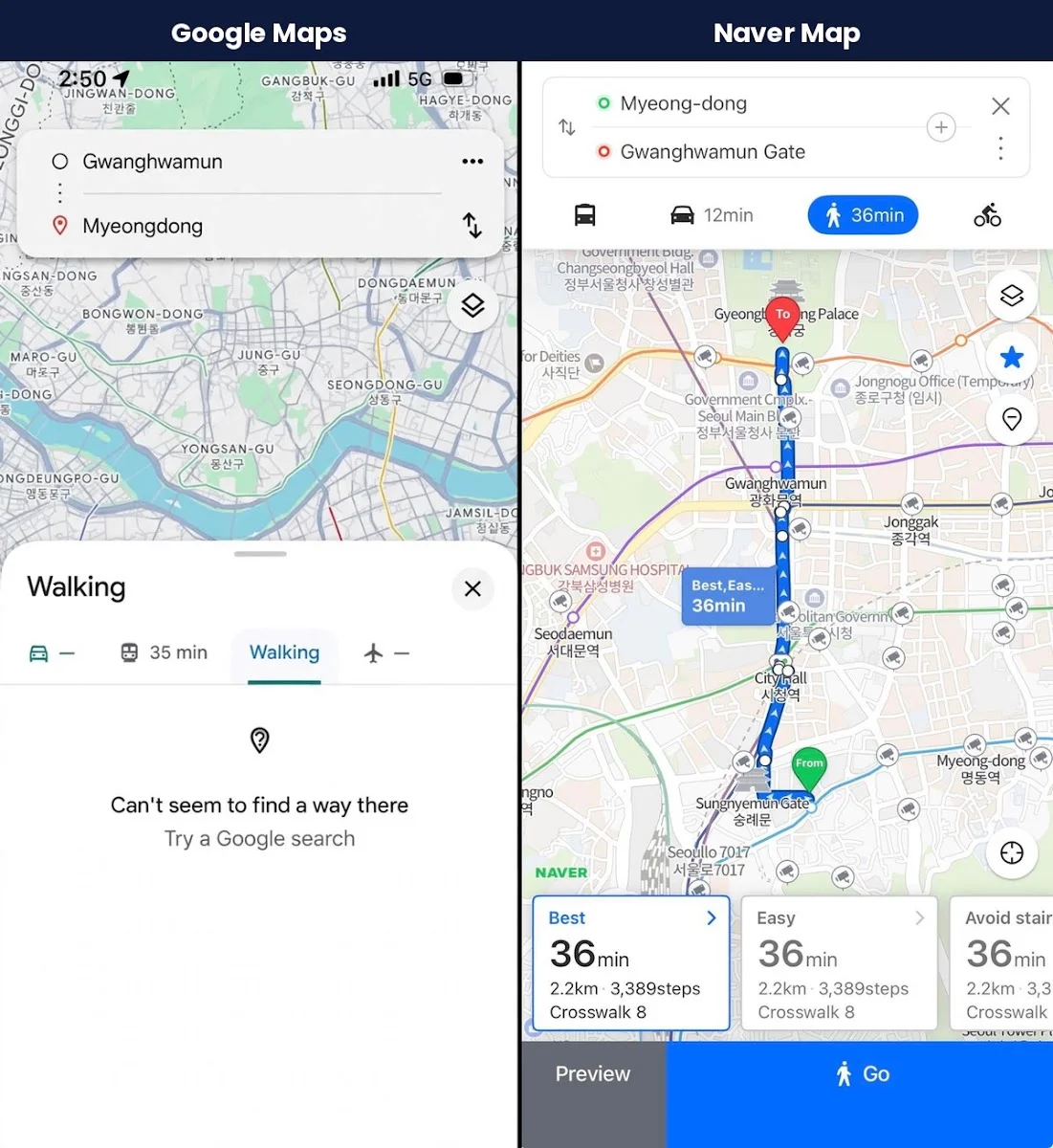
Now look at the Naver Map side. It showed the same walk: 36 minutes, 2.2 km, 3,389 steps, and 8 crosswalks. It even offered an “Avoid stairs” option. That’s the kind of detail you need when you’re dragging a suitcase around a hilly neighborhood.
Naver isn’t the only local option. KakaoMap is the other app Koreans use every day. I ran the same walk there too. It showed a “Shortest Route” of 36 minutes and 2.1 km, plus calories burned and underpasses on the way. Either one will get you where you’re going.

Pro-Tip: The “35 min” you see on Google’s transit tab is real. Use Google for subway and bus ideas if you like its layout. Just don’t count on it to guide you on foot.
Why Doesn’t Google Maps Work Properly in Korea?
It comes down to map data. For years, Korea limited how much detailed map data could leave the country. The reason is security. Korea is still technically at war, since the Korean War ended with an armistice, not a peace treaty. The government didn’t want detailed maps of military sites stored on servers overseas.
That’s changing, slowly. On February 27, 2026, Korea conditionally approved Google’s request to export high-precision (1:5,000 scale) map data. Reported conditions include blurring military and security sites and processing some data through a Korean partner. In August 2026, Google said it plans to bring full map features to Korea. As of today, there is no launch date.
Pro-Tip: “Approved” doesn’t mean “working.” Don’t plan a trip around a feature that hasn’t launched yet. Install Naver Map now. If Google Maps catches up later, you’ve lost nothing.
Public Transit: Where Google Maps Holds Up
For subways and buses, both apps get the job done. I searched for a ride from Incheon Airport into Seoul on both. Google gave me a trip using the Airport Railroad. Naver sorted its results into “Best” and “Fastest” and showed the fare up front (₩17,000 for one bus option).

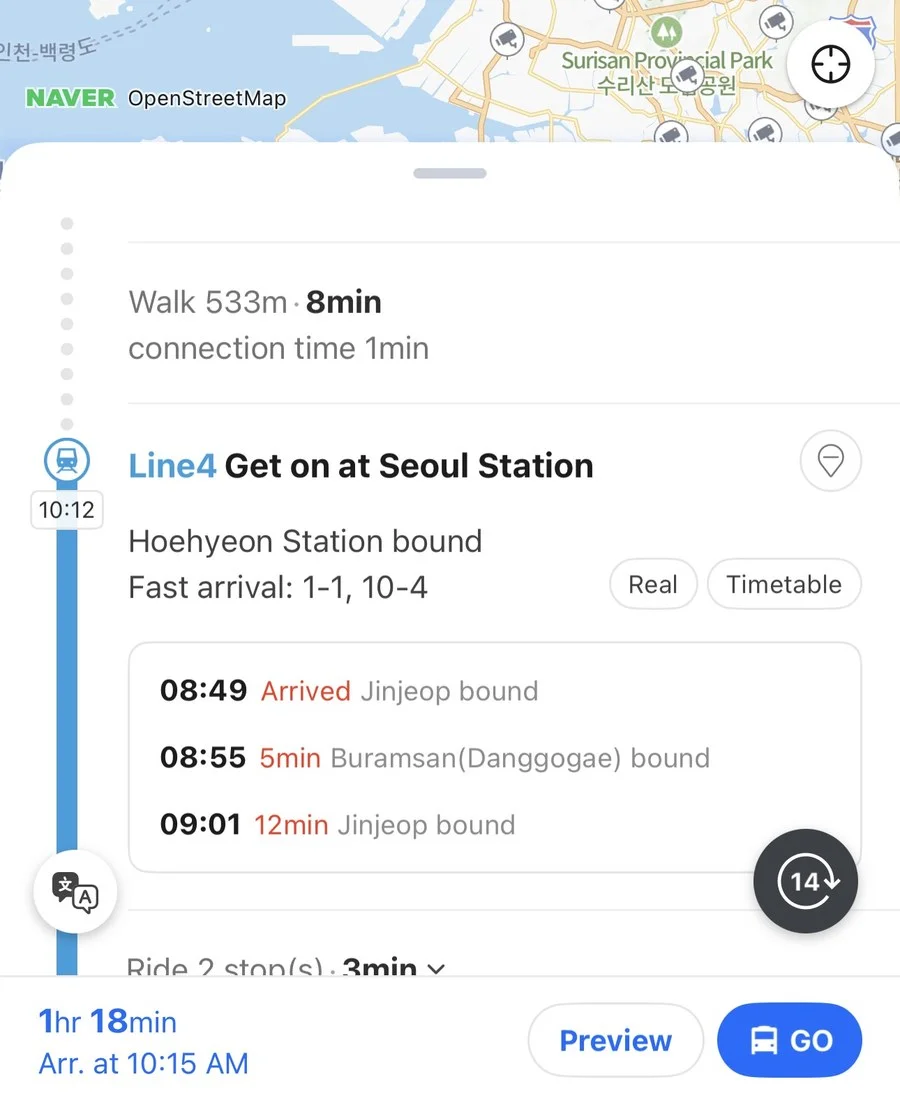
Where Naver pulls ahead is live info. When I opened a subway step, I could see the next trains with a “Real” tab for real-time arrivals and a “Timetable” tab. It also tells you the fastest car to board for the exit you want, like “Fast arrival: 1-1, 10-4.” That’s a small thing until you’re racing a transfer at Seoul Station.
How to Set Up Naver Map in 3 Minutes
- Download Naver Map from the App Store or Google Play before you leave home. Search for “NAVER Map, Navigation.”
- Switch the language to English. Open the app’s settings and pick your language. Naver Map also supports Japanese and Chinese.
- Allow location access so the blue dot works when you’re walking.
- Save your hotel by tapping the star. That way you can always find your way back.
Easy fix: Set up a Korea eSIM before you fly, so you have data the moment you land. My best eSIM for Korea guide compares the options.
Warning: Don’t rely on airport Wi-Fi to get you through your first day. Get mobile data before you land so your map works the moment you step outside.
Naver Map’s Secret Weapon: Booking a Table Right in the App
This is the part most “Google Maps in Korea” guides skip. Naver Map isn’t only a map. On many restaurant listings, you can book a table without leaving the app.
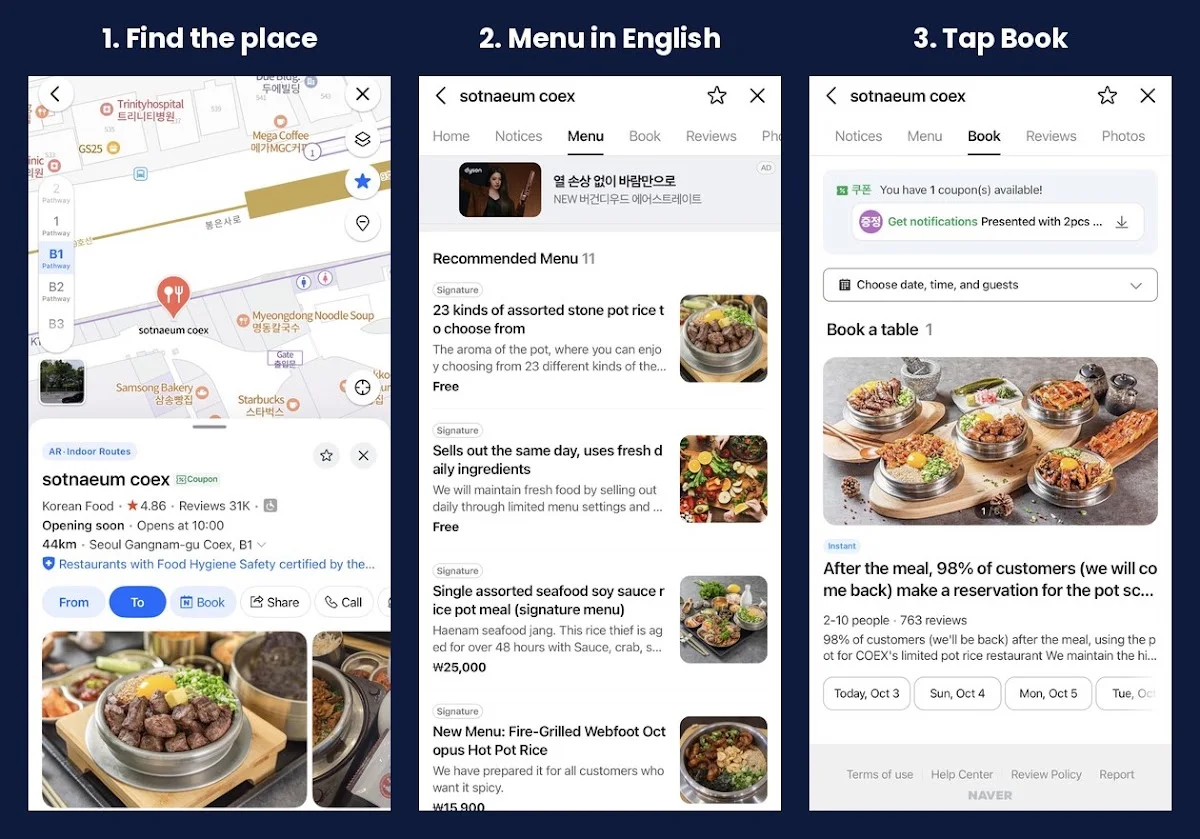
Here’s how it works, using a popular stone-pot-rice restaurant in COEX as my example:
- Find the place on the map. The listing shows reviews, opening hours, and a Book button next to Call and Share.
- Check the menu. The English interface shows menu descriptions and prices in English, so you can decide before you go.
- Tap Book. Pick the date, time, and number of guests. Some listings are marked Instant, which means the booking confirms right away.
I book tables through Naver Map myself, and I never have to make a phone call. The places I’ve booked didn’t ask for a deposit, and I haven’t dealt with no-show fees. As a Seoul resident with a Korean phone number, signing up was easy. Visitors may need an extra step, which I cover below.
Not every restaurant offers booking, though. If you don’t see a Book tab, the place probably takes walk-ins or phone calls only.
Pro-Tip: For popular restaurants, I recommend booking a few days ahead. Slots at the busy places fill up faster than you’d think.
Pro-Tip: Watch the status after you book. If it says “pending” (예약 확인중), the restaurant hasn’t confirmed yet. Wait for “confirmed” before you count on the table.
Do You Need a Korean Phone Number to Book?
You do need a Naver account to finish a booking. According to one 2026 guide, travelers without a Korean phone number can verify their identity with a passport inside the Naver app. The app’s rules can change, so test the sign-up before your trip, not at the restaurant door.
| Option | Best for | Good to know |
|---|---|---|
| Naver Map booking | Traditional Korean spots, small local restaurants | Needs a Naver account; menus can be translated into English |
| CatchTable | Trendy restaurants, fine dining | Has an English interface and a sign-in option for foreigners |
| Hotel concierge | Anything tricky | Totally normal in Korea; they’ll call for you |
| Walk in | Casual places | Arrive early for popular spots |
Warning: Each restaurant sets its own deposit and cancellation rules. Read them before you tap confirm, especially at popular places. Some charge a fee if you don’t show up.
Getting from the airport: My Incheon Airport to Seoul guide compares the AREX train, buses, and taxis, and my Seoul subway guide explains the T-money card for subways and buses.
Driving in Korea? Naver Map Is My Pick
If you rent a car, Naver Map is the app I’d open first. The screenshots below are from a recent drive around the Seoul area.
It Routes Around Traffic
Naver Map reads live traffic and picks a route that avoids jams. The colored bar on the right edge of the screen shows what’s ahead on your route: green means moving, orange and red mean slow. On my drive it also showed a crash on a nearby road, reported by another driver one minute earlier.

The English Guidance Is Excellent
Road names, exits, and toll gates show up in English, like “Incheon TG” for the Incheon toll gate, and the voice guidance can speak English too. On highways, Naver Map also draws the road in 3D and colors the lanes you should be in, so you don’t have to guess at a split. The road signs in the picture are in Korean, just like the real ones, so it helps to match what you see on the screen with what you see out the window.

It Warns You About Speed Cameras
Korea has a lot of speed cameras. Naver Map shows the speed limit and the distance to the next camera, including average-speed zones (marked “Avg. spd.”). That alone made me feel calmer on unfamiliar roads.
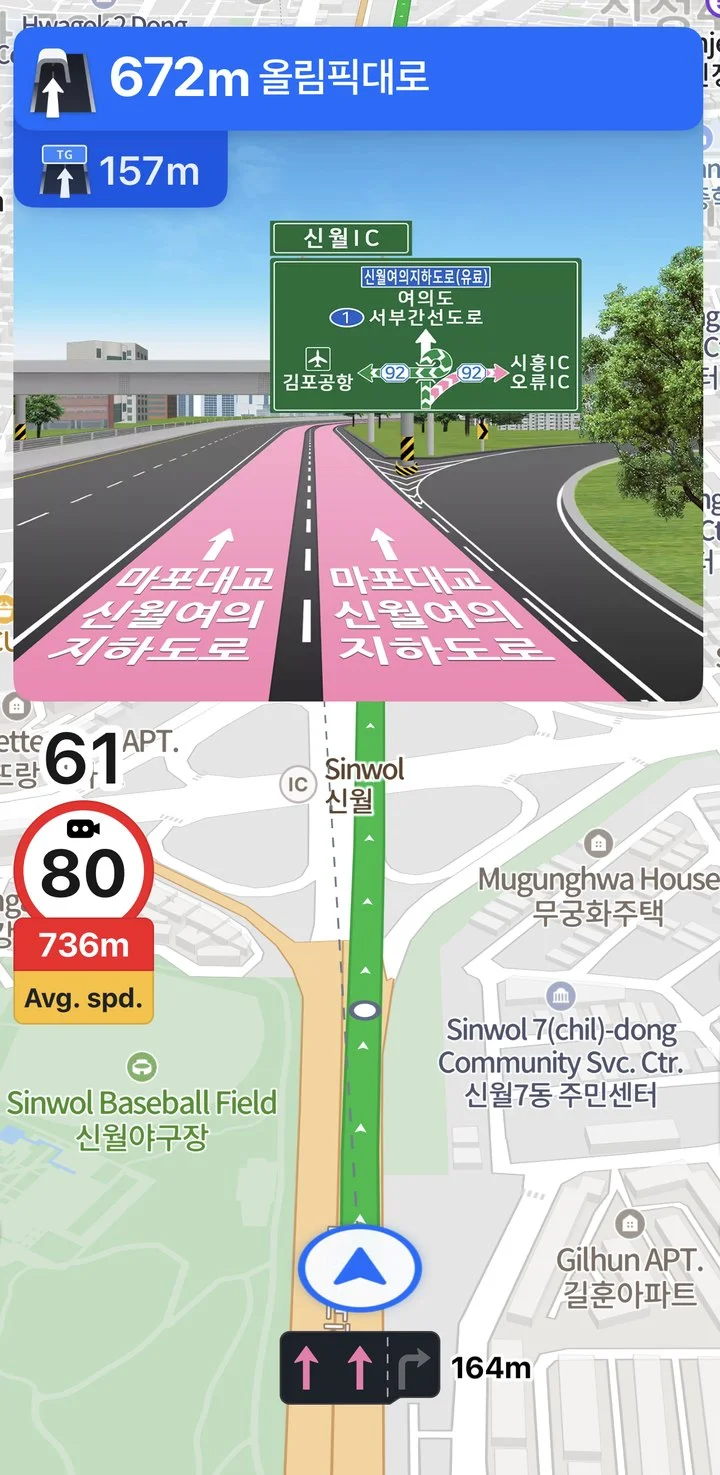
Pro-Tip: Set your destination before you start the car, and use a phone mount or CarPlay. If you’re driving alone, don’t handle the phone while the car is moving.
What About KakaoMap?
KakaoMap is a good second option. It offers similar live-traffic driving directions, and Koreans also use Kakao’s separate driving app, Kakao Navi. The catch is language: according to a comparison on Korea by Car, Kakao Navi is mainly in Korean, while Naver Map has the stronger English support. Both apps need a data connection, so set up a Korea eSIM first.
| For driving | Naver Map | Kakao (KakaoMap / Kakao Navi) |
|---|---|---|
| Live traffic and rerouting | Yes | Yes |
| English | English interface and voice guidance | Mostly Korean |
| Apple CarPlay | Supported | Supported (Kakao Navi) |
| Android Auto | One guide says it’s less polished, so test it first | Supported (Kakao Navi) |
Should You Rent a Car and Leave Seoul?
You don’t need a car in Seoul. The subway is great, traffic is heavy, and parking is expensive. But a rental car is a fun way to reach places trains don’t, like the east coast, Gangwon Province, the southern countryside, or Jeju Island. With Naver Map handling the directions, a day or two on the road is easier than you’d think.
Before you book, check these basics with your rental company, since rules can change:
- License: US drivers generally need an International Driving Permit (IDP) from the US, plus their regular license and passport.
- Age: Many companies require you to be 21 or older and to have held your license for at least a year. Some SUVs and premium cars need 26 or older.
- Tolls: Most rental cars come with a Hi-Pass device that pays highway tolls automatically. Ask how you’ll be billed.
- Insurance: Ask about full coverage. Insurance from a foreign credit card may not be accepted.
Warning: Get the IDP before you fly. You can’t get a US-issued IDP after you arrive in Korea.
My App Setup for Korea (Checklist)
- Naver Map for walking, driving (with live traffic and English guidance), live subway info, and restaurant booking.
- KakaoMap as a second local option, especially if your friends in Korea use it.
- Google Maps as a backup for transit ideas and finding places by their English names.
- Kakao T for taxis. See my guide to Kakao T vs. Uber in Korea.
- Mobile data set up before you land.
- Hotel saved in Naver Map with a star.
Will Google Maps Get Better in Korea?
Probably, yes. Korea’s approval and Google’s own announcement both point that way. But there’s still no launch date, and Google would also need to work with Korean map and transit data. I’d treat any improvement as a bonus, not a plan.
I’ll keep this post updated. If Google Maps starts working for walking or driving, you’ll see it here first.
FAQ
Does Google Maps work in Korea?
Partly. Public transit directions work, but walking and driving directions failed in my October 2026 test. Naver Map handles all of them, so most travelers use it as their main map.
Why doesn’t Google Maps work well in Korea?
Korea restricts the export of detailed map data for security reasons. In February 2026, the government conditionally approved Google’s request for high-precision map data, but a full launch date hasn’t been announced.
Can I book restaurants on Naver Map as a foreigner?
On many listings, yes. You tap the Book button, choose a date, time, and group size, then confirm. You’ll need a Naver account, and the rules for foreigners can change, so set it up before your trip.
Sources: The Korea Times, The Korea Herald, JURIST, Seoul Start’s booking guide, Korea by Car, and Discover Real Korea.